How to Export Inventory from PropBox to Palmstreet
PropBox exports a Palmstreet-ready CSV so you can bulk-create listings with titles, prices, and photos included instead of typing each one by hand.
If you sell plants on Palmstreet, you already know the grind of building listings one at a time. PropBox cuts that down by turning your sellable inventory into a Palmstreet-ready CSV: titles, descriptions, prices, and photos all mapped for import. No retyping, no copy-paste, no spreadsheet wrangling.
PropBox is where you manage inventory, costs, and buyers; Palmstreet is where you run the show. When you're ready to list, your sellable lineup is one export and upload away. Here's the full workflow.
- 1
Get your plants listing-ready in PropBox
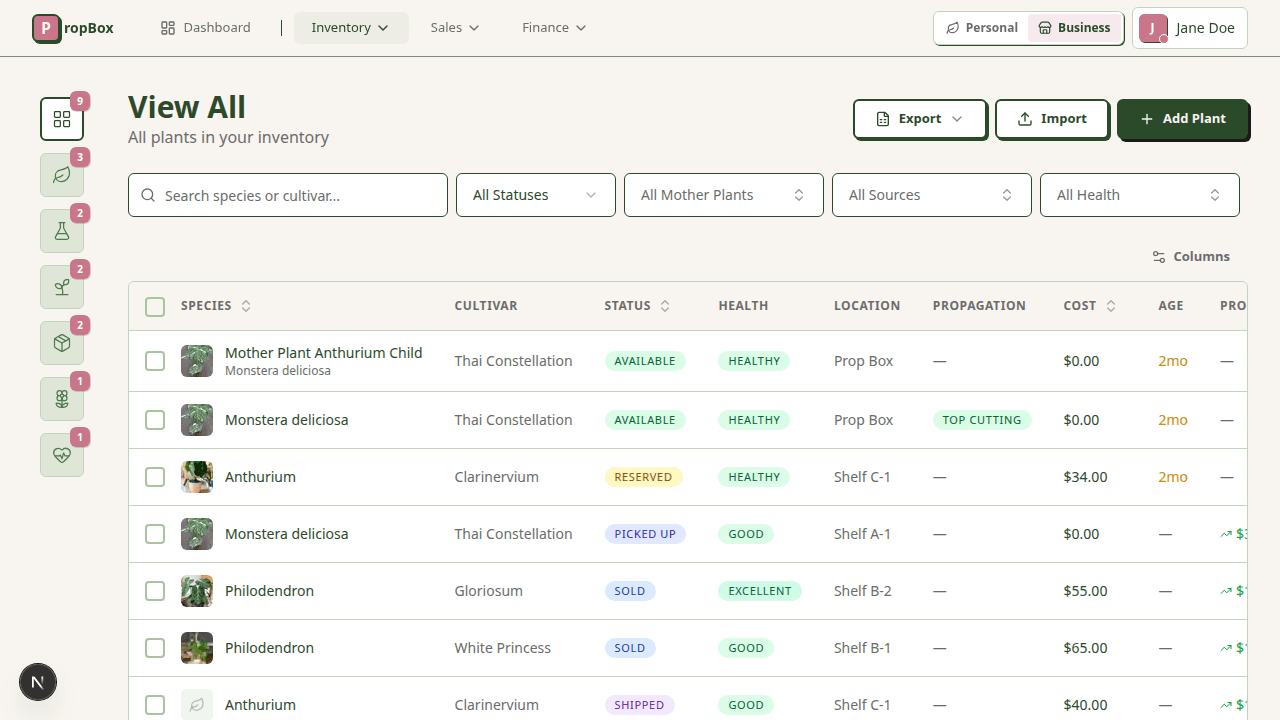
Open Inventory in Selling mode. Only plants that are marked listable, set to the Available status, and tracked as seller inventory get exported, so make sure the plants you want on Palmstreet have a list price, photos, and (optionally) a SKU. Anything reserved, sold, or held back as a mother plant is automatically left out.
- 2
Export the Palmstreet CSV
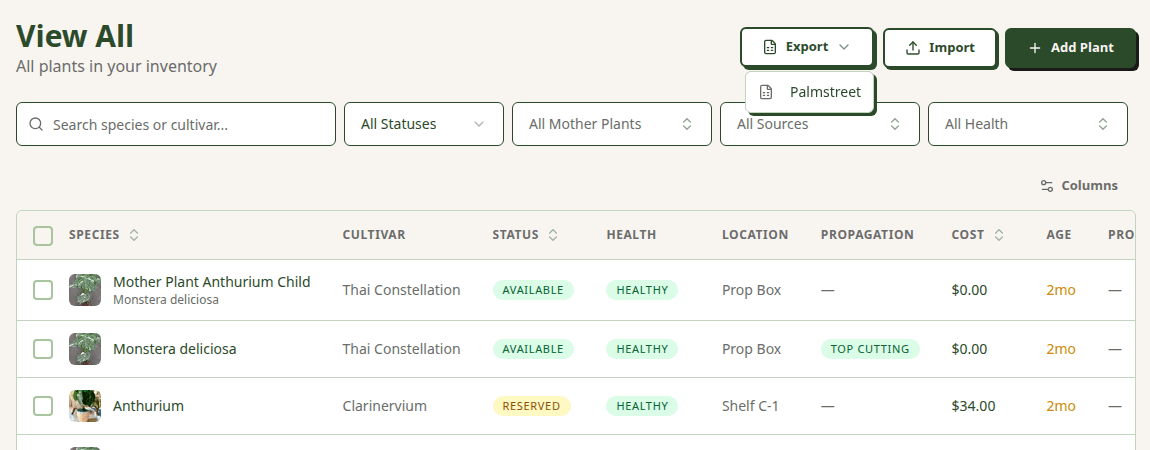
From any inventory view, click Export and choose Palmstreet. PropBox downloads a palmstreet-export.csv file containing every available, listable plant, each as its own single-quantity listing. The file opens cleanly in Google Sheets, Excel, or Numbers if you want to eyeball it first.
- 3
Open Palmstreet's CSV import
In Palmstreet, go to Seller Hub → My Listings → Import → Import by CSV. Palmstreet officially supports Shopify and Etsy CSV formats; PropBox produces the same header layout, so your export slots straight in. Upload the palmstreet-export.csv file you just downloaded.
- 4
Review in the preview screen and publish
Palmstreet shows every listing in a preview screen before anything goes live. Adjust prices, descriptions, and variants here. Note that any plant you left without a price defaults to $10 on Palmstreet, so set prices in PropBox first to avoid surprises. When everything looks right, confirm to publish your listings.
What maps to what
PropBox builds each column of the export to match Palmstreet's listing import template, so nothing needs remapping. Here's exactly how your plant data becomes a Palmstreet listing.
| Palmstreet column | From PropBox | Notes |
|---|---|---|
| Title | Species + Cultivar + Variegation | Composed automatically, e.g. Monstera deliciosa 'Thai Constellation' (Albo). |
| Item description | Notes + plant attributes | Your notes plus a summary line (pot size, rooted status, leaf count). |
| Price | List price | Left blank if unset; Palmstreet then defaults the listing to $10. |
| Quantity | Always 1 | PropBox exports each tracked plant as a single-quantity listing. |
| SKU | SKU | Optional. Carried through if you track stock codes. |
| Image 1 URL … Image N URL | Plant photos | Cover photo first, then the rest in your saved order, as direct hosted URLs. |
| Variant 1 Name / Variation 1 Value | (left empty) | Included for template compatibility; unique plants have no variants. |
Beyond the export
Run the whole live from the same inventory
Exporting helps fill your Palmstreet shop, and the same inventory powers your live show. Build a lineup, go live, and tap through sales from the plant records you already maintain.
Build your lineup in seconds
Drop plants from your inventory into a show lineup, set show-only prices, and drag to lock in your run of show. Every plant you queue is marked Reserved in PropBox, so it's left out of your next Palmstreet export and clearly spoken for during show prep.
Tap-fast when the chat is flying
A full-screen live queue built for one hand: mark each plant Sold or Claimed in a single tap, grab the buyer's handle, and adjust the price on the fly. Keyboard shortcuts (S, C, X) keep you moving as fast as the show does.
Watch revenue climb in real time
Items sold and total revenue update with every tap, so you always know exactly how the show is performing without doing math in your head between drops.
Reconcile in minutes, not hours
When the show ends, match each sale to a buyer and lock in final prices, one at a time or all at once. Plant statuses flip to Sold automatically, so your inventory is accurate the moment you wrap.
Frequently asked questions
Does PropBox sync directly with Palmstreet?
How do I bulk upload listings to Palmstreet?
Can I manage my Palmstreet inventory in one place?
Which plants get included in the Palmstreet export?
Why does my listing show $10 on Palmstreet?
Do my plant photos transfer to Palmstreet?
Make PropBox your inventory command center
Manage every plant in one place, then export to Palmstreet whenever you're ready to list. PropBox is in early access, so join the waitlist.
Keep reading